

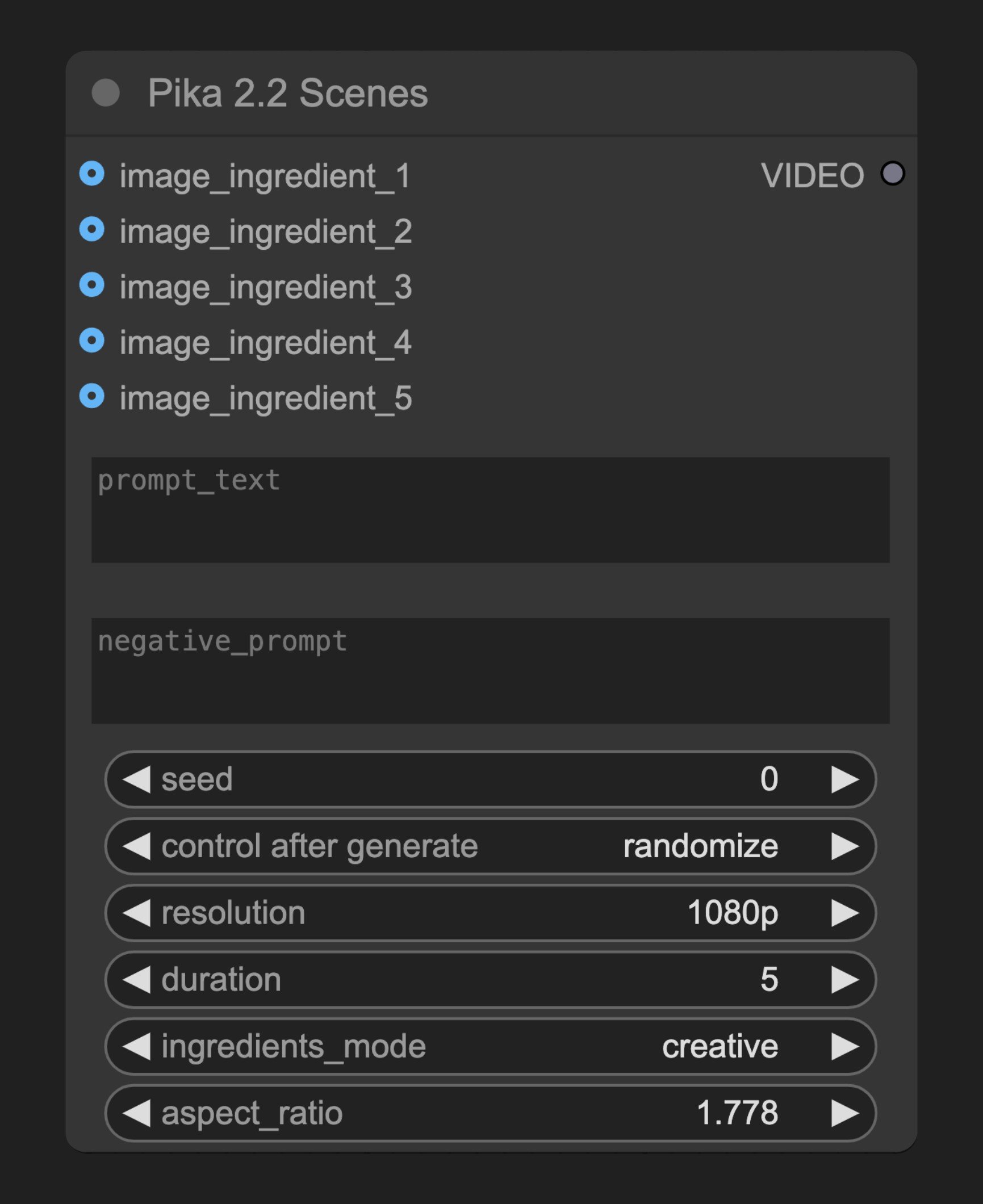
参数说明
必需参数
| 参数 | 类型 | 默认值 | 说明 |
|---|---|---|---|
| prompt_text | 字符串 | "" | 描述视频内容和场景的文本提示词 |
| negative_prompt | 字符串 | "" | 指定不希望在视频中出现的元素 |
| seed | 整数 | 0 | 生成过程的随机种子 |
| ingredients_mode | 选择项 | ”creative” | 图像组合模式 |
| resolution | 选择项 | 根据API默认 | 生成视频的分辨率 |
| duration | 选择项 | 根据API默认 | 生成视频的持续时间 |
| aspect_ratio | 浮点数 | 1.7777777777777777 (16:9) | 输出视频的宽高比,范围0.4-2.5 |
可选参数
| 参数 | 类型 | 说明 |
|---|---|---|
| image_ingredient_1 | 图像 | 场景中的第一张图像 |
| image_ingredient_2 | 图像 | 场景中的第二张图像 |
| image_ingredient_3 | 图像 | 场景中的第三张图像 |
| image_ingredient_4 | 图像 | 场景中的第四张图像 |
| image_ingredient_5 | 图像 | 场景中的第五张图像 |
输出
| 输出 | 类型 | 说明 |
|---|---|---|
| VIDEO | 视频 | 生成的视频结果 |
工作原理
Pika 2.2 Scenes 节点分析所有输入图像,然后创建一个包含这些图像元素的视频。节点将图像和参数发送到Pika的API服务器,处理完成后返回生成的视频结果。 用户可以通过提示词引导视频的风格和内容,通过负面提示词排除不需要的元素。节点支持上传最多5张图像作为素材,并会根据指定的组合模式、分辨率、持续时间和宽高比生成最终视频。源码参考
class PikaScenesV2_2(PikaNodeBase):
    """Pika 2.2 Scenes Node."""

    @classmethod
    def INPUT_TYPES(cls):
        image_ingredient_input = (
            IO.IMAGE,
            {"tooltip": "Image that will be used as ingredient to create a video."},
        )
        return {
            "required": {
                **cls.get_base_inputs_types(
                    PikaBodyGenerate22C2vGenerate22PikascenesPost,
                ),
                "ingredients_mode": model_field_to_node_input(
                    IO.COMBO,
                    PikaBodyGenerate22C2vGenerate22PikascenesPost,
                    "ingredientsMode",
                    enum_type=IngredientsMode,
                    default="creative",
                ),
                "aspect_ratio": model_field_to_node_input(
                    IO.FLOAT,
                    PikaBodyGenerate22C2vGenerate22PikascenesPost,
                    "aspectRatio",
                    step=0.001,
                    min=0.4,
                    max=2.5,
                    default=1.7777777777777777,
                ),
            },
            "optional": {
                "image_ingredient_1": image_ingredient_input,
                "image_ingredient_2": image_ingredient_input,
                "image_ingredient_3": image_ingredient_input,
                "image_ingredient_4": image_ingredient_input,
                "image_ingredient_5": image_ingredient_input,
            },
            "hidden": {
                "auth_token": "AUTH_TOKEN_COMFY_ORG",
            },
        }

    DESCRIPTION = "Combine your images to create a video with the objects in them. Upload multiple images as ingredients and generate a high-quality video that incorporates all of them."
    RETURN_TYPES = ("VIDEO",)

    def api_call(
        self,
        prompt_text: str,
        negative_prompt: str,
        seed: int,
        resolution: str,
        duration: int,
        ingredients_mode: str,
        aspect_ratio: float,
        image_ingredient_1: Optional[torch.Tensor] = None,
        image_ingredient_2: Optional[torch.Tensor] = None,
        image_ingredient_3: Optional[torch.Tensor] = None,
        image_ingredient_4: Optional[torch.Tensor] = None,
        image_ingredient_5: Optional[torch.Tensor] = None,
        auth_token: Optional[str] = None,
    ) -> tuple[VideoFromFile]:
        """API call for Pika Scenes 2.2."""
        all_image_bytes_io = []
        for image in [
            image_ingredient_1,
            image_ingredient_2,
            image_ingredient_3,
            image_ingredient_4,
            image_ingredient_5,
        ]:
            if image is not None:
                image_bytes_io = tensor_to_bytesio(image)
                image_bytes_io.seek(0)
                all_image_bytes_io.append(image_bytes_io)

        # Prepare files data for multipart upload
        pika_files = [
            ("images", (f"image_{i}.png", image_bytes_io, "image/png"))
            for i, image_bytes_io in enumerate(all_image_bytes_io)
        ]

        # Prepare non-file data using the Pydantic model
        pika_request_data = PikaBodyGenerate22C2vGenerate22PikascenesPost(
            ingredientsMode=ingredients_mode,
            promptText=prompt_text,
            negativePrompt=negative_prompt,
            seed=seed,
            resolution=resolution,
            duration=duration,
            aspectRatio=aspect_ratio,
        )

        initial_operation = SynchronousOperation(
            endpoint=ApiEndpoint(
                path=PATH_PIKASCENES,
                method=HttpMethod.POST,
                request_model=PikaBodyGenerate22C2vGenerate22PikascenesPost,
                response_model=PikaGenerateResponse,
            ),
            request=pika_request_data,
            files=pika_files,
            content_type="multipart/form-data",
            auth_token=auth_token,
        )

        return self.execute_task(initial_operation, auth_token)