> ## Documentation Index
> Fetch the complete documentation index at: https://dripart-docs-recommend-assets-api.mintlify.site/llms.txt
> Use this file to discover all available pages before exploring further.
# 编辑您的 ComfyUI 账户付款信息
> 了解如何更新您的付款方式和账单详细信息
## 如何编辑付款信息
1. 登录您的 ComfyUI 帐户并打开个人菜单
2. 点击**用户设置**
3. 在设置面板中选择**积分**选项卡
4. 点击**发票历史记录**打开 Stripe 账单门户
5. 选择**更新信息**并编辑账单或付款详情
6. 在 Stripe 门户中保存更改
### 操作步骤示意
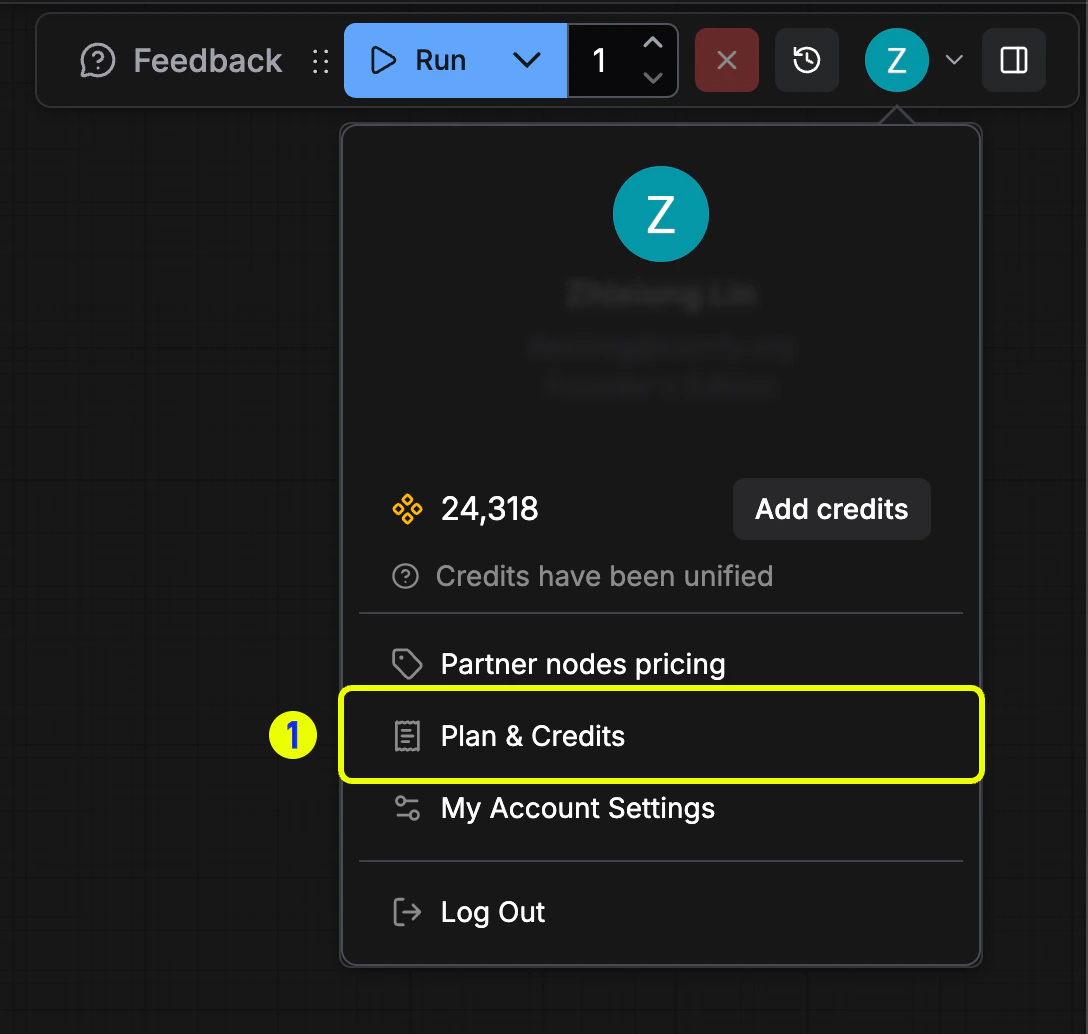 *打开个人菜单并选择**用户设置**以管理账单。*
 *进入**积分**选项卡并点击**发票历史记录**。*
 *在 Stripe 门户中查看可更新的账单信息字段。*
 *点击**更新信息**调整付款详情并保存。*
## 您可以更新的内容
您可以修改以下付款详细信息:
* 信用卡或借记卡号码
* 卡到期日期
* CVV/安全码
* 账单地址
* 付款方式类型(在卡和数字钱包之间切换)
## 更改何时生效
* 对付款方式的更改立即生效
* 您的下一个账单周期将使用更新的付款信息
* 账单信息(姓名、地址、税号)的更新仅适用于未来的发票,已开具的发票无法修改
* 更新付款详细信息时,活动订阅不会中断
## 重要说明
* 您必须在文件中保留有效的付款方式才能维持订阅
* 如果您删除付款方式,则必须在下一个账单日期之前添加新的付款方式
* 若需要留存旧发票,请在修改账单信息前下载并保存
* 更新您的付款信息不会更改您的账单日期或订阅计划
## 故障排除
如果您在更新付款信息时遇到问题:
* 验证所有信息是否正确输入
* 确保您的卡尚未过期
* 检查您的账单地址是否与发卡机构的记录匹配
* 尝试使用其他浏览器或清除缓存
* 如果问题仍然存在,请联系我们的[支持团队](https://support.comfy.org/)
*点击**更新信息**调整付款详情并保存。*
## 您可以更新的内容
您可以修改以下付款详细信息:
* 信用卡或借记卡号码
* 卡到期日期
* CVV/安全码
* 账单地址
* 付款方式类型(在卡和数字钱包之间切换)
## 更改何时生效
* 对付款方式的更改立即生效
* 您的下一个账单周期将使用更新的付款信息
* 账单信息(姓名、地址、税号)的更新仅适用于未来的发票,已开具的发票无法修改
* 更新付款详细信息时,活动订阅不会中断
## 重要说明
* 您必须在文件中保留有效的付款方式才能维持订阅
* 如果您删除付款方式,则必须在下一个账单日期之前添加新的付款方式
* 若需要留存旧发票,请在修改账单信息前下载并保存
* 更新您的付款信息不会更改您的账单日期或订阅计划
## 故障排除
如果您在更新付款信息时遇到问题:
* 验证所有信息是否正确输入
* 确保您的卡尚未过期
* 检查您的账单地址是否与发卡机构的记录匹配
* 尝试使用其他浏览器或清除缓存
* 如果问题仍然存在,请联系我们的[支持团队](https://support.comfy.org/)