> ## Documentation Index
> Fetch the complete documentation index at: https://dripart-docs-recommend-assets-api.mintlify.site/llms.txt
> Use this file to discover all available pages before exploring further.
# ComfyUI-Manager 安装
> 如何为不同环境安装 ComfyUI-Manager
## 桌面版用户
如果您使用的是 [ComfyUI 桌面版](/zh/installation/desktop/windows),ComfyUI-Manager 已默认包含并启用。无需额外安装。
## 便携版用户
对于使用 [Windows 便携版](/zh/installation/comfyui_portable_windows) 的用户,新版 ComfyUI-Manager 已内置于 ComfyUI 核心中,但需要启用。
1. 安装管理器依赖:
```bash theme={null}
.\python_embeded\python.exe -m pip install -r ComfyUI\manager_requirements.txt
```
2. 启用管理器启动 ComfyUI:
```bash theme={null}
.\python_embeded\python.exe -s ComfyUI\main.py --windows-standalone-build --enable-manager
pause
```
## 手动安装用户
对于[手动安装](/zh/installation/manual_install)的用户,新版 ComfyUI-Manager 已内置于 ComfyUI 核心中,但需要启用。
1. 激活虚拟环境:
```bash theme={null}
# Windows
venv\Scripts\activate
# Linux/macOS
source venv/bin/activate
```
2. 安装管理器依赖:
```bash theme={null}
pip install -r manager_requirements.txt
```
3. 运行 ComfyUI 时使用 `--enable-manager` 标志启用管理器:
```bash theme={null}
python main.py --enable-manager
```
### 命令行选项
| 标志 | 描述 |
| ---------------------------- | -------------------------------------------- |
| `--enable-manager` | 启用 ComfyUI-Manager |
| `--enable-manager-legacy-ui` | 使用旧版管理器 UI 而非新版 UI(需要 `--enable-manager`) |
| `--disable-manager-ui` | 禁用管理器 UI 和端点,同时保留后台功能(需要 `--enable-manager`) |
### 切换新旧版UI
以下版本更新仅支持 pip 版本, 通过自定义节点方式安装的版本不支持切换到新版 UI
使用新版本 UI
```bash theme={null}
python main.py --enable-manager
```
使用旧版UI
```bash theme={null}
python main.py --enable-manager --enable-manager-legacy-ui
```
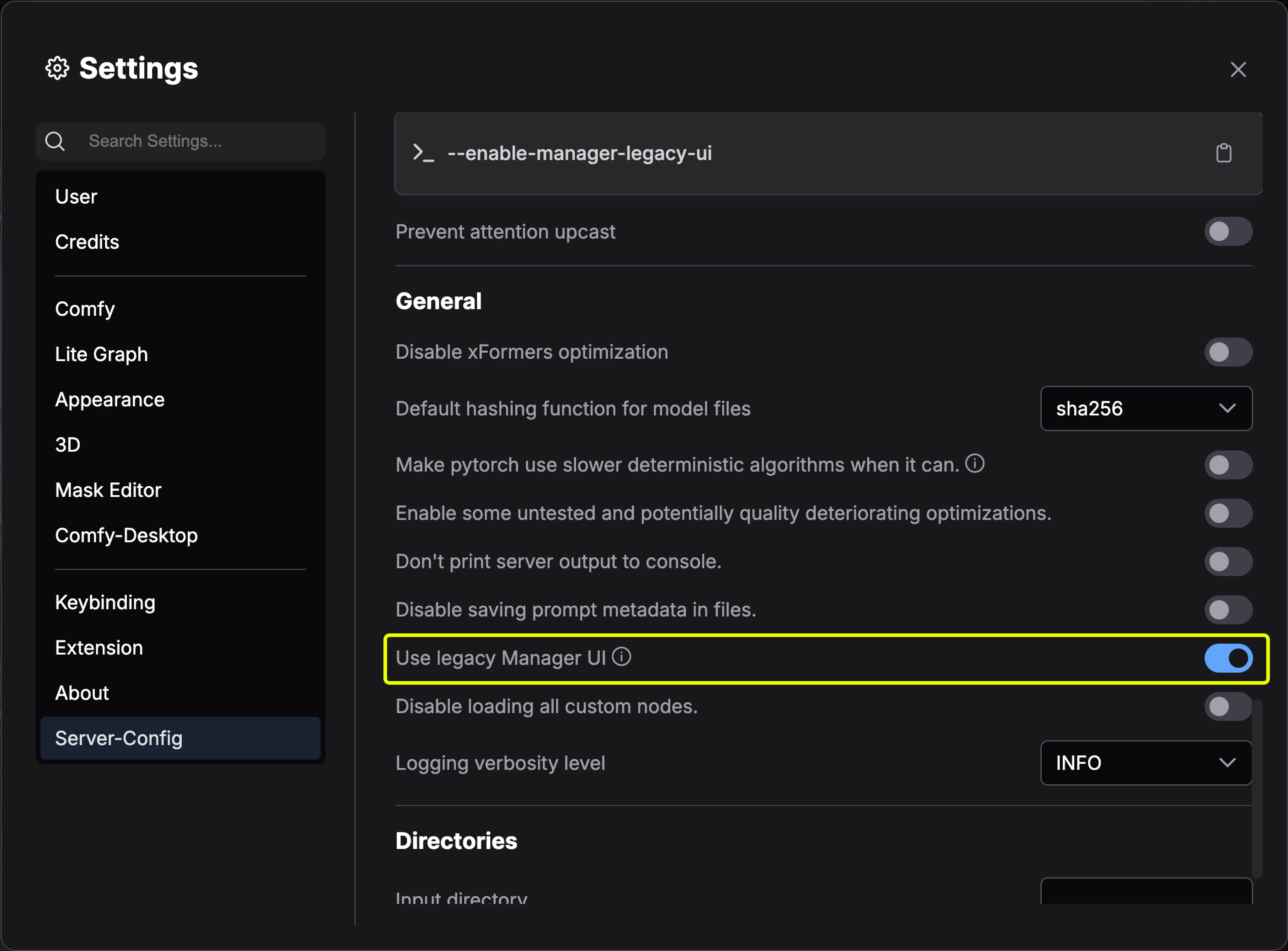
桌面版请在 服务器设置 -> UI 设置 -> 使用旧版管理器界面 切换到旧版 UI
 ## 自定义节点版本安装方法
在现有 ComfyUI 安装基础上安装 ComfyUI-Manager:
1. 在终端中导航到 `ComfyUI/custom_nodes` 目录
2. 克隆仓库:
```bash theme={null}
git clone https://github.com/ltdrdata/ComfyUI-Manager comfyui-manager
```
3. 安装管理器依赖:
```bash theme={null}
cd comfyui-manager
pip install -r requirements.txt
```
4. 重启 ComfyUI
1. 安装 [Git for Windows](https://git-scm.com/download/win)(独立版本,选择"使用 Windows 默认控制台窗口")
2. 将 [install-manager-for-portable-version.bat](https://github.com/ltdrdata/ComfyUI-Manager/raw/main/scripts/install-manager-for-portable-version.bat) 下载到您的 `ComfyUI_windows_portable` 目录
3. 双击批处理文件进行安装
comfy-cli 提供各种功能,可从命令行管理 ComfyUI。
**前提条件**:Python 3、Git
**Windows:**
```bash theme={null}
python -m venv venv
venv\Scripts\activate
pip install comfy-cli
comfy install
```
**Linux/macOS:**
```bash theme={null}
python -m venv venv
. venv/bin/activate
pip install comfy-cli
comfy install
```
另请参阅:[comfy-cli 文档](/zh/comfy-cli/getting-started)
**前提条件**:python-is-python3、python3-venv、git
1. 将 [install-comfyui-venv-linux.sh](https://github.com/comfy-org/ComfyUI-Manager/raw/main/scripts/install-comfyui-venv-linux.sh) 下载到空的安装目录
2. 运行:
```bash theme={null}
chmod +x install-comfyui-venv-linux.sh
./install-comfyui-venv-linux.sh
```
3. 使用 `./run_gpu.sh` 或 `./run_cpu.sh` 执行 ComfyUI
**安装注意事项:**
* ComfyUI-Manager 文件必须准确位于路径 `ComfyUI/custom_nodes/comfyui-manager`
* 不要直接解压到 `ComfyUI/custom_nodes`(`__init__.py` 等文件不应在该目录中)
* 不要安装在 `ComfyUI/custom_nodes/ComfyUI-Manager/ComfyUI-Manager` 或 `ComfyUI/custom_nodes/ComfyUI-Manager-main` 等路径
## 自定义节点版本安装方法
在现有 ComfyUI 安装基础上安装 ComfyUI-Manager:
1. 在终端中导航到 `ComfyUI/custom_nodes` 目录
2. 克隆仓库:
```bash theme={null}
git clone https://github.com/ltdrdata/ComfyUI-Manager comfyui-manager
```
3. 安装管理器依赖:
```bash theme={null}
cd comfyui-manager
pip install -r requirements.txt
```
4. 重启 ComfyUI
1. 安装 [Git for Windows](https://git-scm.com/download/win)(独立版本,选择"使用 Windows 默认控制台窗口")
2. 将 [install-manager-for-portable-version.bat](https://github.com/ltdrdata/ComfyUI-Manager/raw/main/scripts/install-manager-for-portable-version.bat) 下载到您的 `ComfyUI_windows_portable` 目录
3. 双击批处理文件进行安装
comfy-cli 提供各种功能,可从命令行管理 ComfyUI。
**前提条件**:Python 3、Git
**Windows:**
```bash theme={null}
python -m venv venv
venv\Scripts\activate
pip install comfy-cli
comfy install
```
**Linux/macOS:**
```bash theme={null}
python -m venv venv
. venv/bin/activate
pip install comfy-cli
comfy install
```
另请参阅:[comfy-cli 文档](/zh/comfy-cli/getting-started)
**前提条件**:python-is-python3、python3-venv、git
1. 将 [install-comfyui-venv-linux.sh](https://github.com/comfy-org/ComfyUI-Manager/raw/main/scripts/install-comfyui-venv-linux.sh) 下载到空的安装目录
2. 运行:
```bash theme={null}
chmod +x install-comfyui-venv-linux.sh
./install-comfyui-venv-linux.sh
```
3. 使用 `./run_gpu.sh` 或 `./run_cpu.sh` 执行 ComfyUI
**安装注意事项:**
* ComfyUI-Manager 文件必须准确位于路径 `ComfyUI/custom_nodes/comfyui-manager`
* 不要直接解压到 `ComfyUI/custom_nodes`(`__init__.py` 等文件不应在该目录中)
* 不要安装在 `ComfyUI/custom_nodes/ComfyUI-Manager/ComfyUI-Manager` 或 `ComfyUI/custom_nodes/ComfyUI-Manager-main` 等路径