> ## Documentation Index
> Fetch the complete documentation index at: https://dripart-docs-recommend-assets-api.mintlify.site/llms.txt
> Use this file to discover all available pages before exploring further.
# ノードの公開
## レジストリアカウントの設定
以下の手順に従って、レジストリアカウントを設定し、最初のノードを公開してください。
### チュートリアルを見る
### パブリッシャーの作成
パブリッシャーは、レジストリにカスタムノードを公開できる識別情報です。すべてのカスタムノードには、pyproject.toml [ファイル]() にパブリッシャー識別子を含める必要があります。
[Comfy Registry](https://registry.comfy.org) にアクセスし、パブリッシャーアカウントを作成してください。パブリッシャー ID はグローバルに一意であり、後から変更することはできません。これはカスタムノードの URL に使用されるためです。
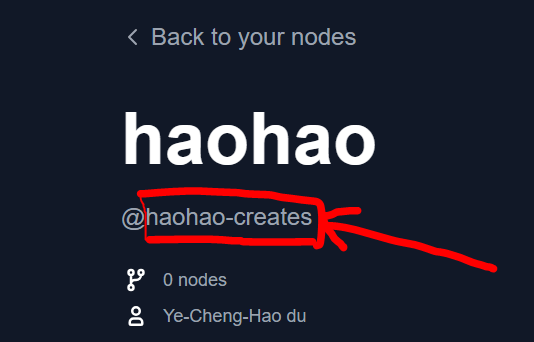
パブリッシャー ID は、プロフィールページの `@` 記号の後ろにあります。
 ### レジストリ公開用 API キーの作成
**重要:** この API キーは、**カスタムノードをレジストリおよび ComfyUI-Manager に公開するため**のものです。ワークフローで有料の API ノードを使用したい場合は、[API ノードの概要](/tutorials/partner-nodes/overview) を参照してください。
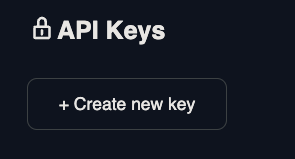
[こちら](https://registry.comfy.org/nodes) にアクセスし、API キーを作成したいパブリッシャーをクリックしてください。このキーは、CLI または GitHub Actions を介してカスタムノードをレジストリ(ComfyUI-Manager を動かすもの)に公開するために使用されます。
### レジストリ公開用 API キーの作成
**重要:** この API キーは、**カスタムノードをレジストリおよび ComfyUI-Manager に公開するため**のものです。ワークフローで有料の API ノードを使用したい場合は、[API ノードの概要](/tutorials/partner-nodes/overview) を参照してください。
[こちら](https://registry.comfy.org/nodes) にアクセスし、API キーを作成したいパブリッシャーをクリックしてください。このキーは、CLI または GitHub Actions を介してカスタムノードをレジストリ(ComfyUI-Manager を動かすもの)に公開するために使用されます。
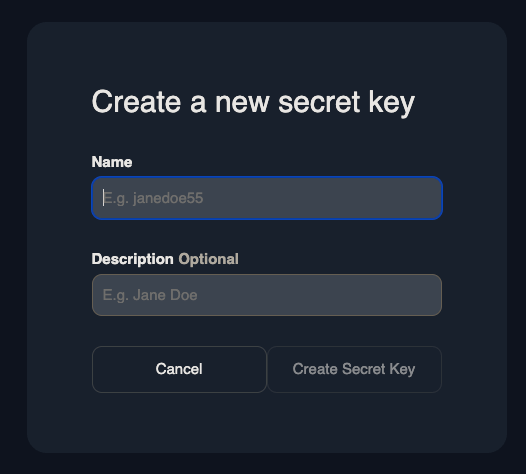
 API キーに名前を付け、安全な場所に保存してください。紛失した場合、新しいキーを作成する必要があります。
 ### メタデータの追加
comfy-cli はインストール済みですか?[まずはこちらを実行してください](/comfy-cli/getting-started)。
```bash theme={null}
comfy node init
```
このコマンドは、以下のメタデータを生成します:
```toml theme={null}
# pyproject.toml
[project]
name = "" # Unique identifier for your node. Immutable after creation.
description = ""
version = "1.0.0" # Custom Node version. Must be semantically versioned.
license = { file = "LICENSE.txt" }
dependencies = [] # Filled in from requirements.txt
[project.urls]
Repository = "https://github.com/..."
[tool.comfy]
PublisherId = "" # TODO (fill in Publisher ID from Comfy Registry Website).
DisplayName = "" # Display name for the Custom Node. Can be changed later.
Icon = "https://example.com/icon.png" # SVG, PNG, JPG or GIF (MAX. 800x400px)
```
このファイルをリポジトリに追加してください。pyproject.toml ファイルの詳細については、[仕様](/registry/specifications) を確認してください。
## レジストリへの公開
### オプション 1: Comfy CLI
以下のコマンドを実行して、ノードを手動でレジストリに公開します。
```bash theme={null}
comfy node publish
```
API キーの入力を求められます。
```bash theme={null}
API Key for publisher '': ****************************************************
...Version 1.0.0 Published.
See it here: https://registry.comfy.org/publisherId/your-node
```
API キーはデフォルトで非表示であることを覚えておいてください。
コピーペースト時、CTRL+V (Windows) を使用すると、末尾に余分な \x16 が付くことがあります。例:\*\*\*\*\*\*\*\*\*\*\*\*\*\*\*\*\*\*\*\*\*\*\*\*\*\*\*\*\*\*\*\*\*\*\*\*\*\*\*\*\*\*\*\*\*\*\*\*\x16。
API キーは右クリックしてコピーペーストすることをお勧めします。
### オプション 2: Github Actions
Github Actions を使用してノードを自動公開します。
Settings -> Secrets and Variables -> Actions -> Under Secrets Tab and Repository secrets -> New Repository Secret に移動します。
`REGISTRY_ACCESS_TOKEN` という名前のシークレットを作成し、値として API キーを保存します。
以下のコードをコピーし、`/.github/workflows/publish_action.yml` に貼り付けます。
```bash theme={null}
name: Publish to Comfy registry
on:
workflow_dispatch:
push:
branches:
- main
paths:
- "pyproject.toml"
jobs:
publish-node:
name: Publish Custom Node to registry
runs-on: ubuntu-latest
steps:
- name: Check out code
uses: actions/checkout@v4
- name: Publish Custom Node
uses: Comfy-Org/publish-node-action@main
with:
personal_access_token: ${{ secrets.REGISTRY_ACCESS_TOKEN }} ## Add your own personal access token to your Github Repository secrets and reference it here.
```
作業ブランチの名前が `main` 以外の場合(例:`master`)、branches セクションに名前を追加してください。
`pyproject.toml` のバージョン番号を更新してプッシュしてください。レジストリに更新されたノードが表示されるはずです。
Github Action は、`pyproject.toml` ファイルを更新してプッシュするたびに自動実行されます。
### メタデータの追加
comfy-cli はインストール済みですか?[まずはこちらを実行してください](/comfy-cli/getting-started)。
```bash theme={null}
comfy node init
```
このコマンドは、以下のメタデータを生成します:
```toml theme={null}
# pyproject.toml
[project]
name = "" # Unique identifier for your node. Immutable after creation.
description = ""
version = "1.0.0" # Custom Node version. Must be semantically versioned.
license = { file = "LICENSE.txt" }
dependencies = [] # Filled in from requirements.txt
[project.urls]
Repository = "https://github.com/..."
[tool.comfy]
PublisherId = "" # TODO (fill in Publisher ID from Comfy Registry Website).
DisplayName = "" # Display name for the Custom Node. Can be changed later.
Icon = "https://example.com/icon.png" # SVG, PNG, JPG or GIF (MAX. 800x400px)
```
このファイルをリポジトリに追加してください。pyproject.toml ファイルの詳細については、[仕様](/registry/specifications) を確認してください。
## レジストリへの公開
### オプション 1: Comfy CLI
以下のコマンドを実行して、ノードを手動でレジストリに公開します。
```bash theme={null}
comfy node publish
```
API キーの入力を求められます。
```bash theme={null}
API Key for publisher '': ****************************************************
...Version 1.0.0 Published.
See it here: https://registry.comfy.org/publisherId/your-node
```
API キーはデフォルトで非表示であることを覚えておいてください。
コピーペースト時、CTRL+V (Windows) を使用すると、末尾に余分な \x16 が付くことがあります。例:\*\*\*\*\*\*\*\*\*\*\*\*\*\*\*\*\*\*\*\*\*\*\*\*\*\*\*\*\*\*\*\*\*\*\*\*\*\*\*\*\*\*\*\*\*\*\*\*\x16。
API キーは右クリックしてコピーペーストすることをお勧めします。
### オプション 2: Github Actions
Github Actions を使用してノードを自動公開します。
Settings -> Secrets and Variables -> Actions -> Under Secrets Tab and Repository secrets -> New Repository Secret に移動します。
`REGISTRY_ACCESS_TOKEN` という名前のシークレットを作成し、値として API キーを保存します。
以下のコードをコピーし、`/.github/workflows/publish_action.yml` に貼り付けます。
```bash theme={null}
name: Publish to Comfy registry
on:
workflow_dispatch:
push:
branches:
- main
paths:
- "pyproject.toml"
jobs:
publish-node:
name: Publish Custom Node to registry
runs-on: ubuntu-latest
steps:
- name: Check out code
uses: actions/checkout@v4
- name: Publish Custom Node
uses: Comfy-Org/publish-node-action@main
with:
personal_access_token: ${{ secrets.REGISTRY_ACCESS_TOKEN }} ## Add your own personal access token to your Github Repository secrets and reference it here.
```
作業ブランチの名前が `main` 以外の場合(例:`master`)、branches セクションに名前を追加してください。
`pyproject.toml` のバージョン番号を更新してプッシュしてください。レジストリに更新されたノードが表示されるはずです。
Github Action は、`pyproject.toml` ファイルを更新してプッシュするたびに自動実行されます。